
In your library account, you can see which media you have borrowed, ordered, or reserved. You can view or extend loan periods and change your catalog password. You can also see any fees that may have been incurred, such as late fees.
Library users who are not affiliated with the FAU can update their email address registered with the Erlangen-Nuremberg University Library (UB). FAUcard users can change their data via the IdM portal of the Regional Computing Center.
Extend Loan Period
In many cases, you can extend the loan period for borrowed media through the catalog.
Reserve Media
You can reserve media that are marked as borrowed in the catalog. The current borrower will then not be able to extend the loan period. Once the item has been returned, you will receive an email and can pick up the media.
Library Account
Book XY is licensed, but the full text is not available. What can I do?
If you find such a medium, please write an inquiry via “Ask a librarian“.
Can interlibrary loan periods be extended?
Whether or not you can extend the lending period depends on the library that sent us your book. If the lending library generally allows extensions, you can extend the lending period via the catalog.
Does research data management mean that anyone can access my data without restrictions? If so, how can I ensure that my data is not analyzed before I want it to be?
You decide who has access to your data, and you can control this through licenses. Generally, you can publish your data with a delay, known as an embargo, or publish only the metadata.
Please keep in mind the specific conditions and policies of your funders and publishers.
How can I access the e-books available at UB?
While conducting literature research in the catalog, you will find e-books in the same way that you find printed editions. You can identify e-books by this symbol  .
.
To search for e-books specifically, select “Electronic Resource” as the publication type from the “Additional Search Options” menu in the search bar.
If you are using a computer within the university network, you will find a link to the full text on the book’s detailed page. You can also access the e-book by clicking the “Full Text” button on the catalog’s results page or on the medium’s details page.

More information about e-books can be found at: https://ub.fau.de/en/searching/e-books/
How can I check my library account?
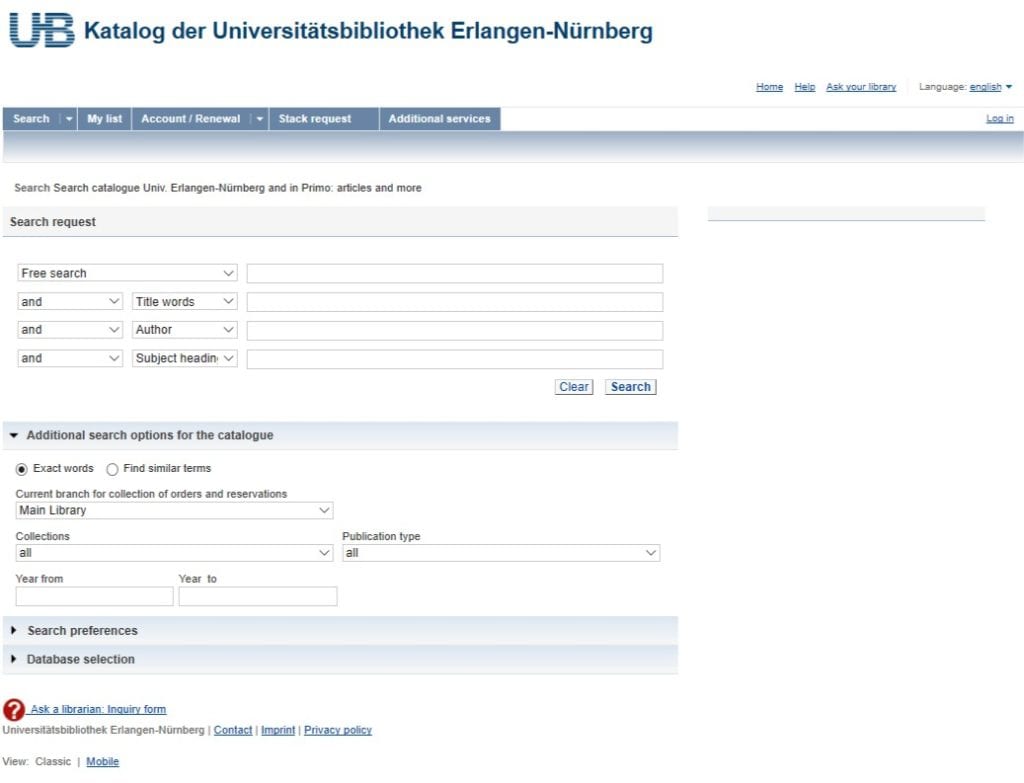
You can check your borrowed media, orders, and reservations at any time through your personal account. After logging in, click Account/Renewal in the catalog.
The Loans, Requests, Reservations, Fines, FAUdok, and ILL: Copies and E-Books submenus will inform you of the current state of your account.
How can I extend the loan period for borrowed media?
Log in to your account via the Account/Renewal tab in the catalog using your UB ID number and password. Your account balance shows all borrowed media. You can now extend the loan period of individual items or renew your entire account. Please note that you can only renew items ten working days before the loan period ends.
Items that have been reserved or renewed six times cannot be renewed. Subsequent renewals are also not possible.
How can I find out which databases are available and how to access them?
The availability of each database is regulated by its access type. The assigned symbol explains the type of access possible depending on the respective license agreement. Further information can be found under “Usage” in the detailed display for a database.
How can i reserve media already borrowed by another user?
If you need literature that has been checked out by another user, you can usually reserve it through the catalog.
- First, select the location where you would like to pick up the item.
- Search the catalog for the desired item.
- Click on the item. This will also give you an overview of potentially available duplicates..
- Click on “Status”; the item will be reserved after you enter your UB ID and your password.
- If more than one copy is available, you will receive the first available copy.
- If, after a year, you still have not received the desired medium, your reservation will be deleted automatically. If you do not want your reservation deleted, you can manually enter a different deletion date via the calendar.
Once you have reserved a medium, the current borrower will no longer be able to extend the lending period. Please note that the estimated return date is not final. The eventual availability of the medium depends on its timely return and other reservations.
You can view an overview of your currently reserved media online via your library account. Select “Check Reservations” to view the current status of your reserved books.
We will notify you via email or in writing when your reservation is ready to be picked up.
Please note that the email address used for email correspondence is, by default, your FAU student email address. If you would like to receive emails at a different address, please add it to your user data in the catalog.
.
How do I register a new address?
All FAU members must report address changes themselves via the IdM homepage, where they can assign one address to the university library.
Please note that, by default, the email address used for email correspondence is your FAU email address. If you would like emails sent to a different address, add the new address to your user data in the catalog.
External users and those without an FAUcard must inform our staff immediately of any change of address. You can do so by contacting our staff at the information desks or by sending us a message via an online inquiry.
I cannot log in to the XY database. What are my library card number and password?
I found an e-book in the catalog, but I can’t access it from my home computer. Why is that?
The catalog usually provides links that lead directly to the publishers’ webpages. Whether or not you are allowed to view the text is determined by your IP address. This means that you must be on the university network to access e-books.
As a member of Friedrich-Alexander University of Erlangen-Nürnberg (FAU), you can access the network using a VPN client. After logging in to the VPN, you can access the full text by clicking the link from the catalog.
As an alternative, you can use the Database Information System (DBIS) to search for e-books. With DBIS, you can access e-books from outside the university network by clicking the link next to “Remote access for all library users “. Log in using your UB-ID or library card number and password.
What are my library card number and password?
Your library card number is 11 digits long. You will find your library card number on your FAUcard or library card, starting with either 028 or 056. (for library users who have registered with their OHMcard).
The password is preset to your birthday in the format day-month-year, for example, 17051982. This feature protects your personal data from unauthorized access.
Please change this password to a personal password in the catalog via the Account / Renewal – Personal Data – Change Password to a personal password function. The new password must consist of at least eight and no more than 12 characters. . You can use letters, numbers, and special characters, except for backslash () and asterisk (=). Please note that the password is case-sensitive.
We recommend changing your password regularly.
What should I do if I forget my account password?
If you have forgotten your password, you can request a new one. When logging into your catalog account, click the “Forgot Password?” button. You will then receive a new password via email.
Students of the Friedrich-Alexander-University, please note that your FAU student email address is used by default for email correspondence. If you would like to have emails sent to a different personal email address, please add it to your user data in the catalog.
What should I keep in mind when using electronic journals?
E-journals are listed in the University Library (UB) catalog and the Electronic Journals Library (EZB).
Searching the catalog has the added benefit of finding printed editions available at the UB. The UB catalog only lists e-journals that are fully available, while the EZB also lists journals that are only partially or not accessible. Often, you can find a table of contents or an abstract.
Please note that more than one URL may be listed in the catalog. For ease of use, simply click the Full Text button to access a journal.
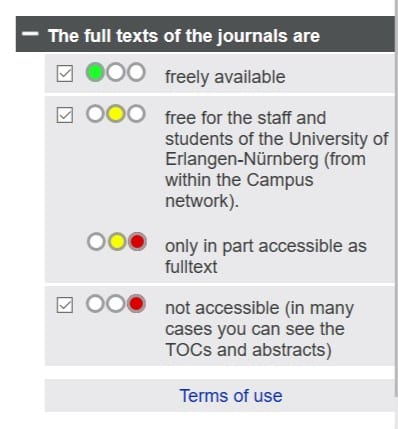
The Electronic Journals Library (EZB) provides quick, structured, and uniform access to full-text scientific journals. The degree to which you have access to the journals is indicated by a system of traffic light symbols.
Titles that the UB has licensed are marked yellow. In such a case, please also consult the respective readme. It will inform you how to access the electronic full texts.
Most licensed journals are only available within the network of the Friedrich-Alexander University Erlangen-Nürnberg.
If you have questions or are having trouble accessing a specific journal, please ask a librarian.
Which library services can I access remotely and which ones require me to be present in person?
The catalog is accessible through our website and offers the means to search, order and borrow books (this entails amongst other things: Checking your library account, renewing of the loan period of previously borrowed media, and reserving of currently lended media)
Full-fledged access to databases and E-Journals requires a PC with connection to the University Network.
Remote access to the network can be granted via a VPN client. The range of accessible media through this method, however, is limited.
Please refer to this page.