
Electronic Resources
What is Google Scholar?
Google Scholar is a search engine which can be used to look up references from scientific literature of multiple disciplines. Its advantages are its large database and an algorithm leading to a useful hit list.
The disadvantages are a poor filtering functionality and a lack of quality assessment regarding the listed items. It is difficult to narrow down search results to a specific academic discipline. The hit list is generated automatically, using formal criteria only.
How do I use Google Scholar?
The academic search engine Google Scholar presents you articles from e-journals and printed media, both with and without a need to pay for access.
Through the linking service SFX, search results from Google Scholar are linked with licensed electronically available media from the University Library Erlangen-Nürnberg (UB), as well as printed media.
Google Scholar has to be set up and personalized for your use:
Access the subpoint „Settings“ via the menu symbol.
There, click on „Library links“.
Enter „Erlangen“ into the textbox.
Select „Universitätsbibliothek Erlangen-Nürnberg SFX@UB_FAU“, then „save“ the selection.
- With articles from journals that the library has a license for, clicking the SFX button leads directly to the full text. This also works from home if you’ve identified yourself as a member of FAU via VPN.
- With books, clicking the SFX button (which can be hard to find at first) will lead directly to the catalogue of the UB.
I found an e-book in the catalog, but I can’t access it from my home computer. Why is that?
The catalog usually provides links that lead directly to the publishers’ webpages. Whether or not you are allowed to view the text is determined by your IP address. This means that you must be on the university network to access e-books.
As a member of Friedrich-Alexander University of Erlangen-Nürnberg (FAU), you can access the network using a VPN client. After logging in to the VPN, you can access the full text by clicking the link from the catalog.
As an alternative, you can use the Database Information System (DBIS) to search for e-books. With DBIS, you can access e-books from outside the university network by clicking the link next to “Remote access for all library users “. Log in using your UB-ID or library card number and password.
When should I search the database and when should I search the catalog?
Databases offer the possibility to look for information independently of the stack available at the University Library of Erlangen-Nürnberg (UB). Depending on the database, you will find books, articles, and essays on different fields of study, when indicated also with access to the electronic full text.
If you look for books or journals available at the UB, it is best to use the catalog.
If you look for literature concerning a certain topic independently of its availablity at a library, use a database.
How can I find papers and articles from journals?
- In the catalog, you will find articles from many electronic resources licensed by the library, as well as others. After entering search terms into the catalog, access the Articles & more tab.
- If you are looking for articles on a specific topic, we recommend to first start looking in databases and bibliographies.
If you have not searched a database that provides full texts, you can then check if an article from a specific journal is available in the catalog, or in the Electronic Journals Library (EZB). If the University Library (UB) owns a license to the respective journal, you should be able to access it from there. - Are you looking for a specific article from a particular journal and want to know if it is available at the UB?
Start by searching the catalog or the Electronic Journals Library (EZB) using the journal’s title to see if the UB owns or has licensed the volume in question.
Where can I find the university library’s databases?
Use the following link: Database Information System (DBIS)
There, you can find descriptions and annotations for using and accessing all the databases.
How can I access the literature that I found in a database?
Often, databases do not provide full texts. Therefore, look for the respective medium in our catalog afterwards or in the Electronic Journal Library (EZB).
Many databases are directly connected to the catalogue through the SFX button.
What does SFX mean?
SFX is a linking service that connects literature research databases to those offering full texts, tables of contents, bibliographic data, and more.
 SFX provides additional literature research possibilities, such as links to other search engines, research services from other catalogs, and links to fee-based document delivery services like Subito.
For more information, please visit the SFX page. If you have any questions, please contact the SFX-team.
What should I keep in mind when using electronic journals?
E-journals are listed in the University Library (UB) catalog and the Electronic Journals Library (EZB).
Searching the catalog has the added benefit of finding printed editions available at the UB. The UB catalog only lists e-journals that are fully available, while the EZB also lists journals that are only partially or not accessible. Often, you can find a table of contents or an abstract.
Please note that more than one URL may be listed in the catalog. For ease of use, simply click the Full Text button to access a journal.
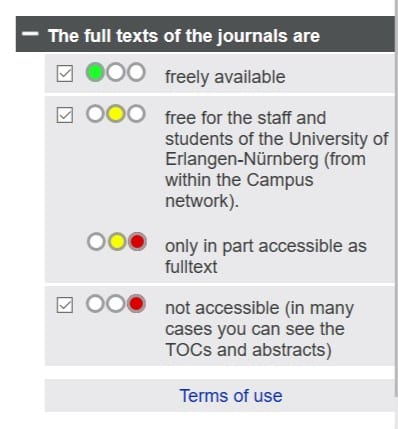
The Electronic Journals Library (EZB) provides quick, structured, and uniform access to full-text scientific journals. The degree to which you have access to the journals is indicated by a system of traffic light symbols.
Titles that the UB has licensed are marked yellow. In such a case, please also consult the respective readme. It will inform you how to access the electronic full texts.
Most licensed journals are only available within the network of the Friedrich-Alexander University Erlangen-Nürnberg.
If you have questions or are having trouble accessing a specific journal, please ask a librarian.
How can I access the e-books available at UB?
While conducting literature research in the catalog, you will find e-books in the same way that you find printed editions.
To search for e-books specifically, select “Online Resources” as the publication type from the “Additional Search Options” menu in the search bar. Within the university network, you can access e-books by clicking the “Read Online” button.
For more information about e-books, please visit our e-books page.
How do I open a PDF file?
If you downloaded a PDF document that did not open, the problem may be with your browser’s PDF reader (assuming it’s Firefox).
Check the Applications setting to see how Firefox usually handles PDF files. Set it to “Use Adobe Reader.”
The login fails when accessing CD-ROMs or databases remotely.
- Have you entered everything correctly? Please check to see if you accidentally pressed Caps Lock.
- Have you recently requested a new password for the catalog?
If so, you must first log into the catalog with your new password before using it for external database access. - Is your FAUcard, or library card, still valid?
Please mind the FAQ regarding the validity.
How can I find out which databases are available and how to access them?
The availability of each database is regulated by its access type. The assigned symbol explains the type of access possible depending on the respective license agreement. Further information can be found under “Usage” in the detailed display for a database.
Why can’t I download the e-book from publisher xy?
E-books can usually be saved and printed for personal use, teaching purposes, or research. However, not all publishers allow this. Some publishers allow you to download individual pages, a chapter, or the entire document.
Please observe the terms of use, license conditions, and copyright conditions of the respective provider.
E-books may not be shared with third parties, either electronically or in printed form. Systematic downloading of complete e-books or large portions of them, especially by robots, is prohibited.
You can find detailed information in the e-book overview.
Can I print or save the results of my search?
Using the library catalog
You can add each individual item to a temporary list by selecting the result and clicking the Save temporarily button. You can send this list via email, export it, print it, or—after logging in to the catalog—save it.
If you want to save search results to a permanent list, log in to the catalog first. Select the search result and click the Save button. Now you can choose a list to save the result to, or create a new list. You can access your lists in your library account.
Using a database
Many databases offer the option to save research results and send them via email or save them to an account. Please follow the specific database’s guidelines for more information.
Using CD-ROM databases
You can save the results of your research, print them, or have them sent to you via email. A manual on how to export data from the CD-ROM server is available in German here: https://ub.fau.de/wp-content/uploads/anleitungen/prometheus.pdf
Note that printing the results of your research may not be possible at every location in the library.
I cannot log in to the XY database. What are my library card number and password?
Book XY is licensed, but the full text is not available. What can I do?
If you find such a medium, please write an inquiry via “Ask a librarian“.